schließen
 

How to register my SiDiary Online with my transaction number?

If you don't have an account at SiDiary-Online you can register now.
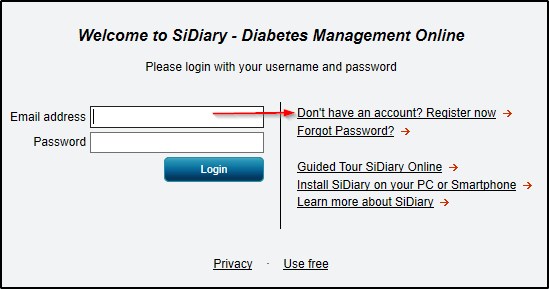
If you have already an account, please enter your Username and Password. If you don't remember it, you can enter the email address which you have used to register this account as username instead. If you have forgotten your password, please use the appropriate link. This will reset your password and you will get a new one to your email address.

If you have purchased a SiDiary USB stick, you can find the transaction number by starting SiDiary on the stick and then switch into the menu 'Help -> Register'.

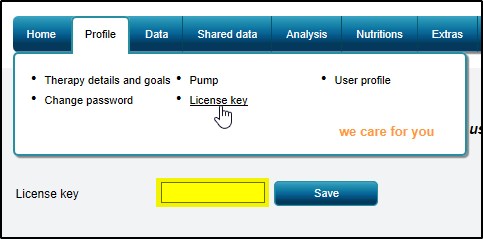
Enter your transaction number in SiDiary Online -> Profile -> License key:
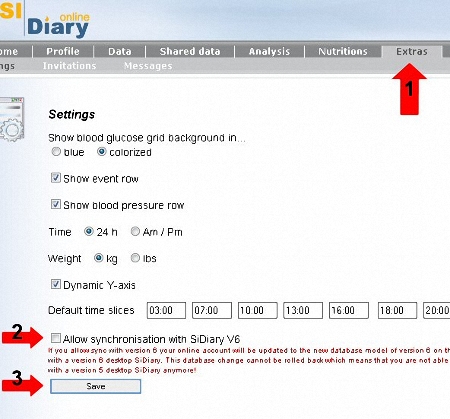
If you have registered at SiDiary-Online for the first time before 1st of July 2009 you can switch your SiDiary-Online to allow the synchronization with Version 6. Please read the article How to transfer my data properly from V5 into V6?
If you encounter any problems with it, please don't hesitate to contact us at support.sidiary@sinovo.de. We will be glad to help you!



SiDiary Online, unlock, register, transaction number

TÜV-Zertifiziert

SINOVO IST TÜV-ZERTIFIZIERT

Lesen Sie hier mehr darüber... »»»
SINOVO auf Facebook
Auszeichnungen

TESTURTEIL: SEHR GUT!

SiDiary mehrfach ausgezeichnet »»»
iPhone Diabetes-Tagebuch Diabetes App Android Diabetes-Tagebuch am PC

WÄHLEN SIE IHRE PLATTFORM!

SiDiary für unterwegs und zuhause »»»
Unterstützte Messgeräte

EINE LÖSUNG FÜR ALLE!

SiDiary für mehr als 300 Messgeräte »»»